GPSR Check for Amazon, eBay and OTTO Listings: What Sellers Must Verify
The GPSR applies to marketplace listings in the same way as to your own shop: every offer must show the manufacturer, an EU contact if the manufacturer is outside the EU, information that identifies the product, and its warnings. Our GPSR checklist explains the four blocks.
On a marketplace, two things are different. You don't control the page layout, and the information you enter in the seller account is not always what the shopper sees. That gap is exactly where problems arise. EcoClaim's free GPSR check reads your listings as a shopper would.
The Regional Court of Hechingen (23 April 2026, 5 O 37/25 KfH) dealt with marketplace listings whose manufacturer details were stored by the seller and showed in another language view, but not in the German one. The seller was held responsible: what counts is what the consumer sees, and a platform error was no defence.
Where each marketplace shows the details
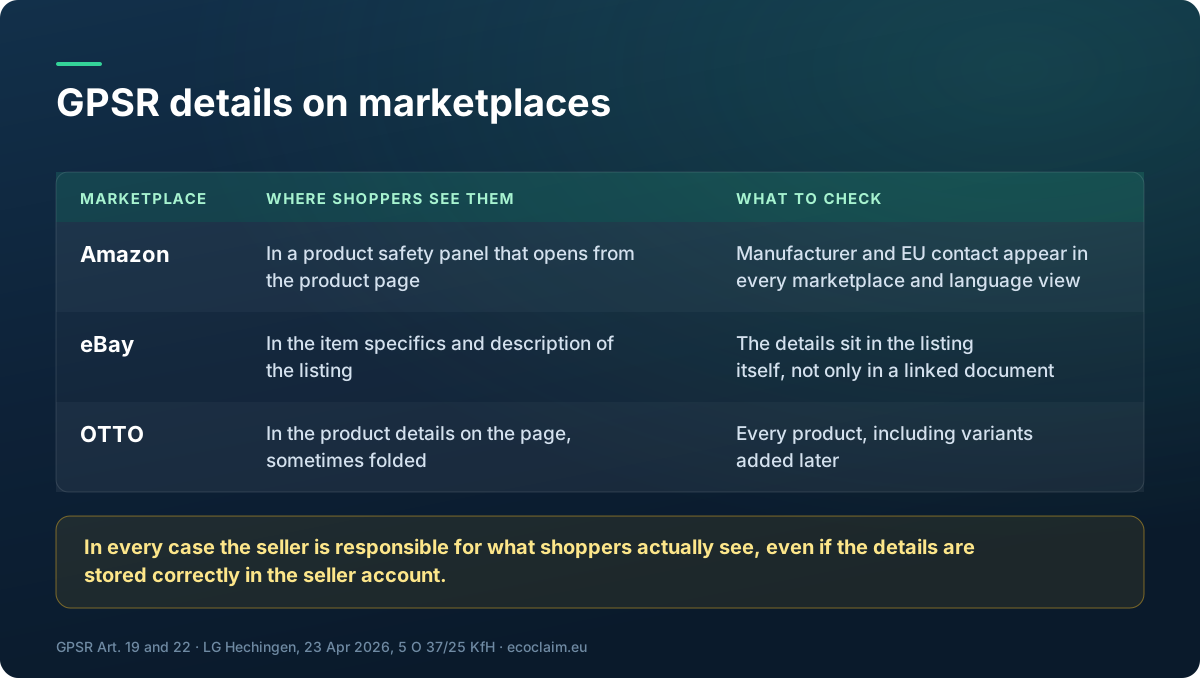
Under Article 22 of the GPSR, marketplaces must design their interfaces so that sellers can provide the Article 19 information and shoppers can see it with the offer. In practice, each marketplace does this differently:
- Amazon shows the manufacturer and the EU responsible person in a product safety panel that opens from the product page. Sellers fill the details in Seller Central. Check every marketplace and language view separately: the Hechingen case was about details that showed in one view and not in another.
- eBay shows the details in the item specifics and description area of the listing. Make sure they sit in the listing itself, not only in a linked document or your seller profile.
- OTTO shows the details in the product details on the product page, sometimes in a folded section. Check each product, including variants added later.
What goes wrong on marketplaces
- Fields filled for one marketplace, empty for another: the German view shows nothing while the English one is complete.
- Bulk uploads that skip the safety fields for some products or variants.
- Manufacturer entered, EU responsible person missing for products from non-EU brands.
- Warnings only in the product images, in a language that doesn't match the marketplace.
- New listings created after the clean-up that never got the details.
Free GPSR checker: scan and fix every product page
Opening hundreds of listings by hand, in each marketplace view, is not realistic. In EcoClaim, add one of your product links as a site and paste your other product links or ASINs underneath. The scan reads exactly those products, in the marketplace's language, and for Amazon it opens the product safety panel the way a shopper would before reading it.
For each product you get the result per block (shown, incomplete, separate page, not found, couldn't confirm, doesn't apply) and a ready block to paste into your seller account. The safety check is free in every scan from an EcoClaim account, and the re-check after you fix a listing is free too.
Run a free GPSR check
Add your product links, and see for every listing whether the manufacturer, EU contact, product ID and warnings reach the shopper. Free in every scan, re-check included.
Check my product pagesFAQ
Isn't the marketplace responsible for showing the details?
The marketplace must give you the fields and display them with the offer. But you remain responsible for your listing. A German court held a seller liable when stored details did not appear in the German view.
Do I need to check each Amazon marketplace separately?
Yes. Each marketplace and language view is its own offer to the shopper. Check that the details appear in each one.
Can EcoClaim read Amazon's product safety panel?
Yes. The scan opens the panel the way a shopper would before reading the page. If the panel cannot be opened, the result is 'Couldn't confirm', never a breach.
Which marketplaces does the check support?
Any marketplace product link we can read. Amazon (the EU marketplaces), OTTO and eBay.de are tested; for others, a scan that cannot read a product page returns its credit automatically.
Is the safety check a separate purchase?
No. It runs in every scan from an EcoClaim account, including free accounts. Re-checking after a fix is free.
Free account
Keep your compliance work in one place
Scans you run while signed out disappear when you close the tab.
- Save every scan and come back to it later
- See whether your score improves after you fix things
- Store certificates against the claims they prove